
Tech review: PreSonus Studio One (The Young DAW)

By Brian-Lupiya
08 Jun 2022 - 14:39


“Create without boundaries, produce without limits.” That‘s PreSonus’s slogan for its award-winning digital audio workstation (DAW) Studio One. I call it ‘The Young DAW’ because it’s development started in 2006 and the first version was announced only three years later in April 2009.
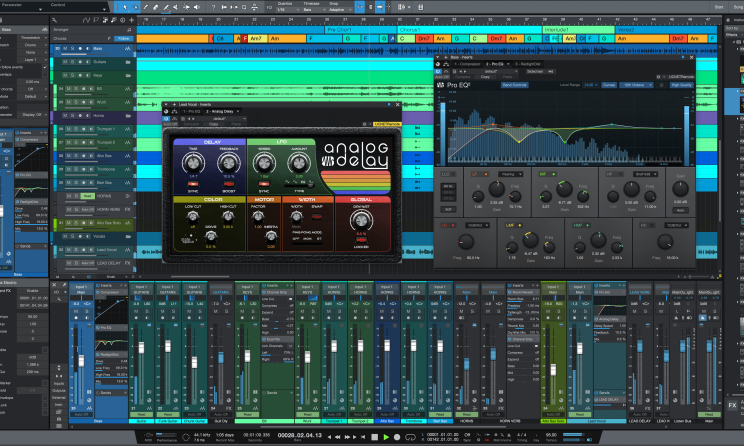
This makes the DAW only 13 years old, which, in my opinion, gives it an edge over other DAWs, especially because there is no ‘legacy’ code in it, making it run extremely light; this also makes it exceptionally stable.
I first used Studio One when V4 cam e out. I got the Artist version for free with my AudioBox iTwo interface. I must admit, I was only halfway sold until I realised I could drag and drop almost anything anywhere and it would be ready for use instantly.
That was it for me. The simplicity with which I could navigate the DAW really had me hooked on it. Mt love for Studio One only got deeper as PreSonus updated it, adding more functionality to the DAW. Only Studio One provides integrated tools that take you right from inception of your creative idea to full expression in a complete mastered project. “The standard of end-to-end production..."
Here are some of my favourite features:
Drag and drop
Audioloops, virtual instruments, plugin effects and even presets. You can drag and drop anything into your workspace from the browser and you’re ready to go. Want to copy FX chains from one channel to another? Drag and drop. How about MIDI to audio or vice versa? Drag and drop. Upload or download files to and from Sphere workspaces? You guessed it: drag and drop. Studio One is made for ease of use.
Show Page
Go from the studio to the stage or livestream with the Show Page. It allows you to create a setlist of songs you have already produced within Studio One. You can include live instruments, virtual instruments, backing vocals, and so on, to make your performance dynamic and interesting. Each song on the setlist can have its own unique properties. You can rearrange the songs however you like, alter your performance in real time, and loop sections or jump to different parts of your performance without skipping a beat.
Project Page
This DAW allows you to link your songs and stems to a mastering workspace for all those finishing touches. What really makes the Project Page special is that you can transfer your stems to it for mastering – but if you want to make a change to any of the stems, you can swing back to the Song Page, do your changes, update with a single click and head back to your Project Page without losing any previous work or progress.
Studio One is your one-stop-shop for your production needs. It is jam packed with myriad useful tools to help you be as expressive as possible. All these features in an easy-to-use intuitive DAW that fits the modern musician, producer and creative. I have not been disappointed yet.
Check out my Studio One video below:
[video:https://youtu.be/7HcZh-OL_io width:744 height:446 autoplay:0]


Most popular

Open call: AIR Festival 2026 seeks local talent in Knysna
04 Feb 2026

AI music firms, major labels clash over ‘Walled Garden’ model
04 Feb 2026
YouTube restricts background play to Premium users across all browsers
04 Feb 2026

Bruce Resnikoff appointed UMe chairman, Jamie Krents named CEO
04 Feb 2026

Interview: South African artist Nomisupasta
03 Feb 2026

Apple Music flags 2 billion fraudulent streams amid AI audio surge
03 Feb 2026


Disclaimer: Music In Africa provides a platform for musicians and contributors to embed music and videos solely for promotional purposes. If any track or video embedded on this platform violates any copyrights please inform us immediately and we will take it down. Please read our Terms of Use for more.

Subscribe to our monthly Newsletter
Follow us on social media


